Character AI users like you and me have a reason to prepare for the unexpected. Following the company’s Chapter 11 bankruptcy filing this month, the platform remains operational, but its long-term future is uncertain. If you have spent months building characters, developing relationships, and writing long-running roleplay stories, waiting until an official shutdown announcement could leave you scrambling to save everything.
The good news is that you can start migrating your conversations now. PovChat AI and SillyTavern support importing Character AI chats through different workflows, letting you preserve conversation history and continue your roleplay elsewhere.
Current State of Character AI’s Bankruptcy Filing
On October 12, 2026, Character Technologies, the company behind Character AI, filed for Chapter 11 bankruptcy in Delaware. The filing initiated a court-supervised sale process intended to find a buyer for the company’s assets and potentially keep the platform running.
Character AI is still operational, and an immediate shutdown has not been announced. Existing subscriptions remain active, with billing unchanged for now. However, the company’s future depends on the outcome of the sale process, which it expects to conclude by late November or early December 2026.
Disney has been named the initial bidder in a proposed $20 million deal for a non-exclusive license to certain Character AI technology and intellectual property. In fact, since Disney already took what it wanted the most – talents or a great portion of the Character AI team, I doubt if they want the product itself other than non-exclusive license of code or content.
The company has warned that if no viable buyer emerges to continue operating the platform, Character AI could be wound down.
What Can Happen to Your Character AI Chats?
Your Character AI conversations are not necessarily going to disappear because of the bankruptcy filing, but there is no guarantee that your chat history will remain accessible indefinitely or that a future owner will maintain the service under the same conditions.
Character AI says user information continues to be protected under its existing privacy policy and that users can request a data export. However, questions remain about how user data might be handled during a sale and what would happen to stored conversations if the platform shuts down. A coalition of state attorneys general has raised concerns about consumer privacy and called for protections during the bankruptcy process, including an opportunity for users to delete their data before a sale and limits on using conversations to train AI without appropriate consent.
There are three main possibilities for your chats:
- The platform continues under new ownership. Your conversations might remain available, although the service, privacy terms, or features could change.
- Character AI shuts down. Access to conversations stored on the platform could eventually be lost if you have not saved copies.
- User data is handled as part of a sale or wind-down. The exact outcome depends on the transaction, applicable privacy obligations, and any court-ordered protections. The final treatment of existing chats remains uncertain.
Here’s the obvious take: if Character AI has no buyer to continue running the product, then it will have to get shut down, and you’ll need to preserve whatever you’d like yourself. Otherwise, users like you and me may lose these chatbots and private conversations forever.
Is Character AI shutting down?
Not yet as of October 2026. Character AI says its service will continue operating during the bankruptcy sale process. However, the company has indicated that the platform could be wound down if no viable buyer emerges to continue the service. I hope the website is not shut down soon, but given the huge debt, negative cash flow, and worrying legal risks, I can’t think of a potential buyer that can keep it running.
Therefore, your safest move is to back up important conversations, character definitions, personas, and lorebooks now rather than relying entirely on the platform.
Best Character AI alternatives for importing chats
1. PovChat AI: The easiest way to bring your chats over
PovChat AI offers a dedicated Character AI chat-import tool, making it a practical option for users who want to preserve their existing conversations without manually rebuilding every story.
Unlike a character-only import, this feature lets you bring an existing conversation into PovChat AI so you can read it alongside your other chats.
How to import your Character AI chat to PovChat AI:
- Open your conversation on Character AI in a desktop browser.
- Scroll upward until every message you want to save has loaded.
- Right-click an empty area of the page and select Save As, or press Ctrl+S on Windows or ⌘+S on Mac.
- Save the page as Webpage, Complete. Do not choose HTML Only.
- Locate the resulting
.htmlfile and upload it to PovChat’s import page. You do not need to upload the accompanying folder.
Import your chat here: https://povchat.ai/import-chat/
The imported conversation is initially read-only. To continue chatting, you must add the character’s details, especially the system prompt (named “Character Traits” on PovChat) so your character can keep the original personalities:
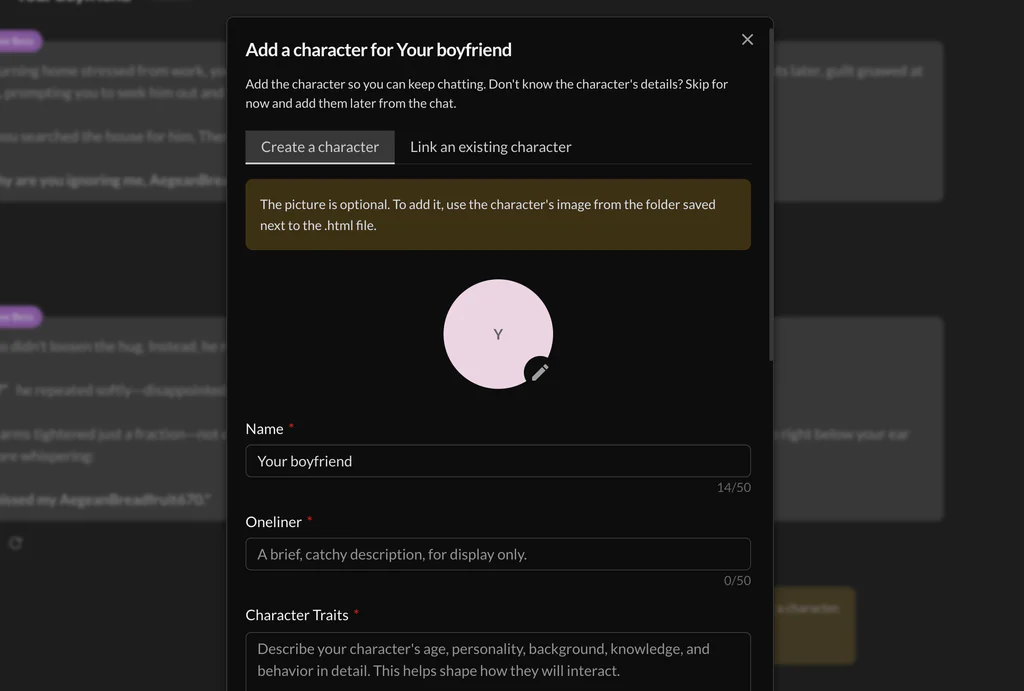
After you create the character or link to another character you’ve created, then you can continue chatting on top of the imported chat history. If the personality still feels off, you can adjust the system prompt or change from a variety of AI models.
This is the cleanest solution for AI roleplayers who want a straightforward way to preserve their Character AI conversations and continue them on a hosted platform.
2. SillyTavern: Best for customization and long-term control
SillyTavern is a customizable roleplay interface that connects to compatible AI models and providers. It supports character cards and chat-history imports, including Character AI conversations exported using compatible CAI Tools formats.
Unlike a hosted chat service, SillyTavern gives you more control over your character files, conversation archives, prompts, and fictional worlds.
Basic migration process:
- Export your Character AI conversation and character information into compatible files.
- Install and configure SillyTavern.
- Import the character card and conversation using the appropriate import functions.
- Review the character’s personality, scenario, and story history.
- Connect a compatible AI model and test the roleplay.
SillyTavern requires more setup than PovChat, and AI usage may involve separate provider costs. However, its support for reusable files and World Info makes it attractive for roleplayers with elaborate lorebooks and long-running stories.
This solution is best for players who want extensive customization and greater control over their roleplay data, or are already SillyTavern users.
Is CAI Tools worth paying for?
CAI Tools can help export Character AI conversations into formats that other applications can use. It can export your chatbots too, all at the frontend level in your browser.
However, the importing features require a paid membership, and paying for a tool solely to escape Character AI may not be worthwhile at this point.
Before subscribing, check whether the free functionality or another export method meets your needs. PovChat’s HTML import workflow, for example, uses the browser’s built-in Save As feature, so you can try that route without purchasing a CAI Tools membership.
Use CAI Tools if a particular feature genuinely saves you time, not because you assume it is required for every migration.
Do not forget your character definitions and lorebooks
Importing a conversation does not necessarily transfer your entire Character AI setup.
Back up these items separately:
- Character definitions: Personality, greeting, description, scenario, and custom instructions.
- Personas: The details you use to represent yourself in different roleplays.
- Lorebooks: Worldbuilding entries, locations, relationships, and fictional rules.
- Story summaries: Important events, unresolved conflicts, and relationship developments.
For long-running roleplays, a short summary of the current story can help a new AI model maintain continuity. Different platforms and models behave differently, so importing a transcript does not guarantee identical character responses.
Should you wait for the official Character AI export?
Request it, but do not rely on it as your only backup.
Character AI’s published instructions warn that official data exports can take three to four weeks to process, and download links are valid for seven days. That may be inconvenient if many users request their data at the same time.
While waiting, save your most important conversations manually or use a compatible migration tool. Keep the original files and check that your imported chats are complete before deleting anything.
Conclusion
Character AI has not confirmed an immediate shutdown, but its bankruptcy makes this a sensible time to protect your roleplay history.
For the simplest chat migration, try PovChat AI’s HTML import tool. For a more customizable setup, consider SillyTavern. CAI Tools can be useful, but a paid membership is not necessarily worth it for a one-time migration.
Most importantly, do not wait until you lose access to your account. Save your conversations, preserve your character details, and make sure your stories can continue even if Character AI does not.